
Gather: Family Location & GPS
gather.lifeLifestyle
4.6483.00 Reviews
- Version
- 1.470.6
- Installs
- 100.00K
- Age Rating
- Everyone
Screenshots

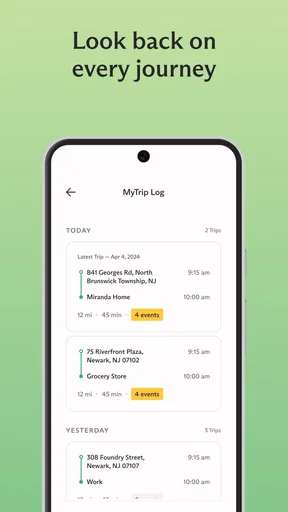
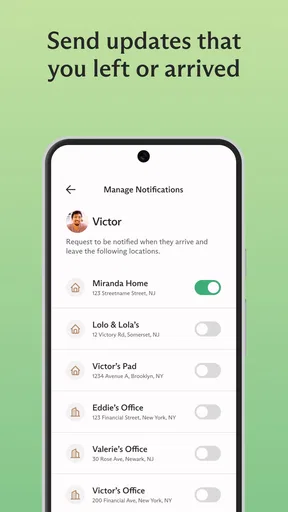
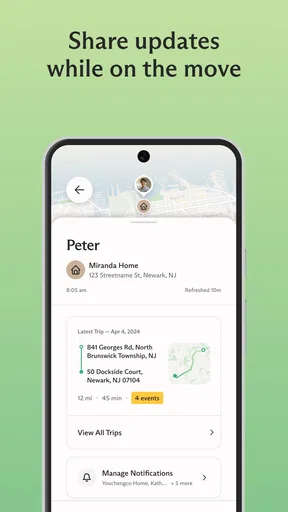
Our Review of Gather: Family Location & GPS
 Analysis by Appyee
When I first opened Gather: Family Location & GPS, I understood its appeal quickly: it is a lifestyle app built around keeping a chosen group connected through location sharing. The idea is simple, but the usefulness depends on how comfortably everyone in the group agrees to use it. I found it most convincing as a calm, practical tool for families who want an easier way to check where one another are, rather than as a replacement for every communication app on a phone.
Gather is free, developed by gather.life, and available for everyone to use. Its current Android version is 1.446.0 and it works with Android 7.0 or later. The app has reached over 100K installs and holds a 4.6 average from around 5.2K ratings, which suggests that the central idea is resonating with many users. Those figures are encouraging, but they do not remove the need to think carefully about privacy, battery behavior, and whether every member of a family actually wants location sharing.
What using Gather feels like in everyday life
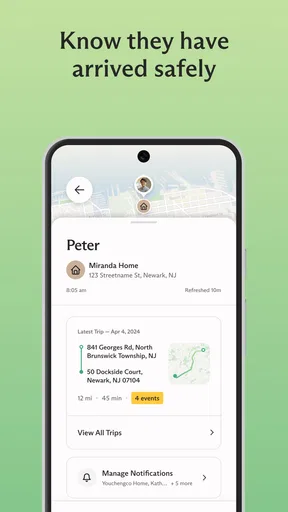
The best way to understand Gather is to imagine a normal weekday rather than an emergency. A parent leaves work, a teenager is travelling home, and another family member is already at the house. Instead of sending several messages asking where everyone is, the group can use the app to see the shared location information in one place. That does not eliminate the need to call or text, but it can reduce small check-in conversations that become repetitive.
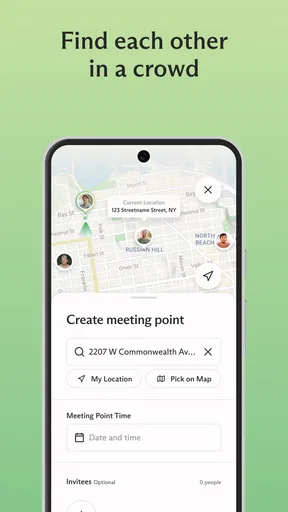
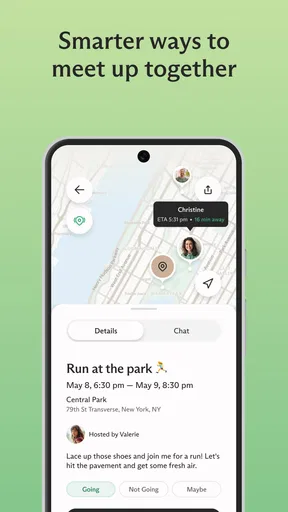
I also see value in short-term coordination. If relatives are meeting in an unfamiliar area, a shared view can make it easier to work out who has arrived and who is still travelling. For families with children, the benefit is less about watching every movement and more about having a quick way to understand whether someone is on the way, has reached a destination, or may need a call.
That distinction matters. Location sharing works best when it supports an existing relationship built on trust. It can become uncomfortable when one person treats it as constant surveillance. Before inviting anyone, I would explain what the app is for, who will be able to see the location, and when sharing should be paused. The technology is straightforward; the social agreement around it deserves just as much attention.
Gather is not trying to be a full family organizer in my experience. Its identity is much narrower and clearer: shared family location with a practical GPS focus. If your main need is a shared calendar, a shopping list, group chat, or detailed task planning, a different app may serve you better. If the repeated question in your household is “Where are you now?” this is where Gather makes more sense.
What to prepare before inviting people
The smoothest first session starts with a little preparation. Decide which people genuinely need access instead of adding every contact simply because the option is available. A small group is easier to understand, and it makes the map more useful. I would begin with the people involved in the everyday routine, then expand only if the first arrangement feels comfortable.
It also helps to choose a clear purpose for the group. “Everyone can see everyone all the time” is vague and can create tension. “We use this when travelling home or meeting somewhere” is easier for everyone to accept. This is one of the non-obvious strengths of a location app: the quality of the experience depends less on adding many people and more on agreeing how the information will be used.
Because the app deals with location, I would avoid treating installation as a one-tap decision. Read each system prompt carefully and choose the option that matches your household’s needs. If a family member is not comfortable with ongoing sharing, do not pressure them. Gather can be useful only when the people involved understand the arrangement and participate willingly.
Getting through the first setup without confusion
After installing Gather, I would take a slow approach rather than immediately sending invitations. Start by looking through the main screen and identifying where the family or group view is located. The first useful milestone is not adding a large number of people; it is understanding whose information appears, what the location view means, and how you would stop sharing if you changed your mind.
When you invite another person, explain the reason in ordinary language. A message such as “I’m trying this so we can see when we are heading home” is better than an unexplained invitation. The other person should know that accepting changes what can be shared with the group. This small step prevents one of the most common problems with family-location tools: people accept first and only later wonder what they agreed to.
Keep the first group deliberately small. I would add one trusted family member, confirm that the connection works, and then decide whether the arrangement is worth extending. This staged setup is more reassuring than creating a large network and trying to understand several moving parts at once.
Another useful habit is to test the app while everyone is together. When the invited person is nearby, you can compare what each phone shows and make sure both people recognize the same group. That turns the first session into a controlled check rather than a stressful discovery made while somebody is already travelling.
The first meaningful success
For a first-time user, the most satisfying test is simple: one person leaves for a familiar destination while another stays behind, and the group checks whether the location view helps answer a real question. For example, a parent could leave the house to collect a child, while the child’s caregiver checks whether the parent is still travelling. Once that works, the app has proved its value in a way that a setup screen cannot.
I would not test it during a rushed airport journey or an unfamiliar late-night trip. Use a normal route first. Notice how quickly the information becomes useful, whether the map is easy to interpret, and whether the person viewing it understands what they are seeing without needing a long explanation. The point is not to measure the app like a laboratory experiment; it is to discover whether it reduces uncertainty in your own routine.
A practical workflow is to combine Gather with a short message. The location view can answer “roughly where are you?” while a text can answer “are you still coming?” or “should I start dinner?” Trying to make location sharing carry every detail creates unnecessary confusion. I found the strongest use comes from letting the app handle position and letting conversation handle context.
This also shows why Gather may feel different from ordinary messaging apps. A chat can tell you where someone says they are, but that information becomes outdated as soon as the person moves. A map can provide a more current picture, while still requiring judgment. If the phone has poor connectivity, the person has stopped sharing, or the location has not updated, the map should not be treated as absolute proof of someone’s exact situation.
Common misunderstandings to avoid
The first misunderstanding is assuming that seeing a person on a map means knowing everything about their situation. It does not tell you why they stopped, whether they are safe, or whether they can answer a message. I would use the location as a prompt for sensible communication, not as a substitute for it.
The second is expecting the app to solve every family coordination problem. Gather is focused on location and GPS sharing. It is not the right choice if your household mainly needs appointment reminders, shared documents, detailed travel plans, or a long conversation history. In those cases, a calendar, messaging service, or dedicated family organizer may be a better companion.
Another point that deserves attention is battery and background behavior. Any app connected with location can raise questions about power use and phone settings. I would pay attention to how the phone behaves during the first few days, especially on an older device, and review system settings if the experience feels inconvenient. I would also avoid leaving location sharing active simply because it is easier. A clear routine for when sharing is useful is more sensible than treating it as a permanent obligation.
People can also misunderstand the difference between a technical problem and a privacy choice. If a family member disappears from the view, they may have lost connectivity, changed a permission, closed the app, or intentionally stopped sharing. The correct response is not immediately to assume something is wrong. Contact them directly, then check the app settings together when possible.
For children and teenagers, the conversation is especially important. A parent may see a safety benefit, but the young person should still understand what is being shared and why. I would set expectations about when the information will be checked and avoid turning every delay into an interrogation. Used respectfully, Gather can support independence; used aggressively, it can undermine trust.
How it compares with familiar alternatives
Many people already use a messaging app to share a live location for a particular journey. That approach is useful when the need is temporary and limited to one conversation. Gather feels more appropriate when the same family members repeatedly need a shared location view as part of everyday life. The trade-off is that a dedicated location app asks everyone to adopt another service and think more deliberately about access.
Phone-based location tools can also be convenient, especially when a household already uses the same device ecosystem. They may integrate naturally with existing accounts and system features. Gather’s appeal is that it presents itself specifically around family location rather than making you search through a broader collection of phone functions. Whether that is better depends on your household: simplicity of purpose can be valuable, but another app can also mean another place to manage.
Compared with a family chat, Gather reduces the need to ask for repeated updates, but it cannot replace the human information that a conversation provides. Compared with a general safety tool, it may feel less complicated if all you want is a shared family map. Compared with a dedicated vehicle tracker, it is better suited to people and family coordination than to monitoring a car as a separate object. The right choice comes down to the question you are trying to answer.
If you want a permanent family location arrangement with minimal conversation, you should think carefully before choosing it. If you want a visual aid for agreed, everyday coordination, it is easier to justify. I would recommend Gather to families who have a recurring need and are willing to discuss boundaries. I would skip it if nobody wants location sharing, if the household already has a trusted tool that does the same job, or if the real problem is scheduling rather than whereabouts.
Small habits that make the app more useful
My first tip is to establish a “why are we checking?” rule. Before opening the map, ask whether you need practical information or reassurance. This sounds minor, but it prevents the app from becoming a reflex that encourages unnecessary monitoring. A location service is healthier when it supports a specific decision, such as whether to start cooking or whether somebody has reached the meeting area.
My second tip is to review the group after the first week. Remove people who do not need access and ask whether the remaining members find the arrangement helpful. A smaller group is often clearer than a large one, particularly when different relatives have different expectations about privacy.
My third tip is to use a direct message whenever the map creates uncertainty. If a person appears to be stationary, do not build a story around that single detail. Send a normal message or call. This habit protects against both technical misunderstandings and needless worry.
My fourth tip is to practise changing the sharing arrangement before you need to do it. Knowing where the relevant controls are gives everyone more confidence. It also makes consent feel real: people are more likely to participate comfortably when they know they can review or change their choice rather than feeling locked into the original setup.
Finally, treat the app as part of a routine, not as the routine itself. For a school pickup, family visit, or journey home, it can remove friction. For emotional reassurance, it should be paired with conversation. That balance is the difference between a useful location aid and an app that quietly adds stress.
Who should try Gather now?
Gather is a good fit for a family that wants a shared GPS view, has a small group of trusted users, and can agree on sensible boundaries. It is also approachable for someone trying this kind of app for the first time because the central purpose is easy to understand: connect the people who need to share location and use the map to coordinate everyday movement.
The free price makes experimentation easier, and the Everyone content rating means it is positioned for broad household use. Its 405 reviews add another sign that people are actively engaging with it, although my recommendation would still depend on your family’s habits rather than popularity alone. A high rating cannot decide whether location sharing is appropriate for your relationships.
I would be more cautious about recommending it to someone who wants detailed transport tracking, a complete family planner, or a tool that works without any discussion of privacy. I would also avoid presenting it as a safety guarantee. No location app can replace a phone call, local emergency services, or sensible travel planning.
For a first-time user, my suggested path is straightforward: install Gather, create the smallest useful group, explain the purpose before inviting anyone, test it on a familiar route, and then decide whether it genuinely saves time or worry. If that first test answers a real household question without creating new tension, the app has earned a place in the routine. If it does not, there is no reason to force it.
Overall, I see Gather as a focused lifestyle app rather than an all-purpose family platform. Its strength is the directness of its location-sharing purpose, while its main challenge is the responsibility that comes with showing where people are. Used with consent, clear expectations, and ordinary communication, it can make family coordination feel lighter. That is the situation in which I would recommend Gather: Family Location & GPS: not as a way to watch people, but as a practical shared reference for people who already trust one another.
Privacy and Permissions
See what permissions an app requests and how it handles your data.
- Contacts
- read your contacts
- Location
- approximate location (network-based), precise location (GPS and network-based)
- Photos/Media/Files
- read the contents of your USB storage, modify or delete the contents of your USB storage
- Storage
- read the contents of your USB storage, modify or delete the contents of your USB storage
- Camera
- take pictures and videos
- Microphone
- record audio
- Wi-Fi connection information
- view Wi-Fi connections
- Other
- view network connections, full network access, run at startup, control vibration, prevent device from sleeping
Verdict
Strengths of Gather: Family Location & GPS
- Accurate location sharing with useful real-time map updates.
- Simple check-ins make it easy to confirm family members are safe.
- Supports private groups for different family or friend circles.
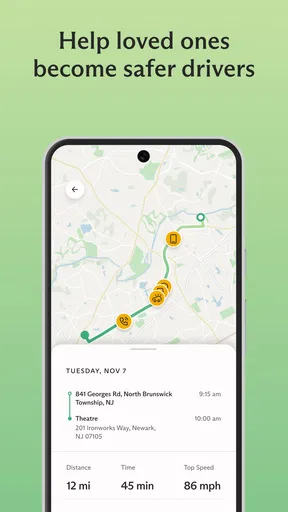
- Location history can help review recent trips and arrivals.
- Emergency features provide quick access to important contacts.
Limitations of Gather: Family Location & GPS
- Continuous GPS use may noticeably reduce battery life.
- Some advanced safety features may require a paid subscription.
- Location updates can be delayed in areas with weak mobile coverage.
- All members must install the app and enable the required permissions.
- Sharing precise locations may raise privacy concerns for some users.
Similar Picks in This Category
View All
SmartThings
Samsung Electronics Co., Ltd.4.6

Google Home
Google LLC4.0

Pinterest4.2

Astrotalk - Talk to Astrologer
Astrology & Horoscope4.7

My Verizon
Verizon Consumer Group4.5

Samsung Wallet (Samsung Pay)
Samsung Electronics Co., Ltd.4.1
Frequently Asked Questions
What is Gather: Family Location & GPS used for?
Gather: Family Location & GPS is designed to help families and trusted groups stay connected by sharing real-time locations, checking arrival and departure updates, and coordinating plans. After setting up a private group, members can view one another on a map when location sharing is enabled. It is most useful for parents, couples, caregivers, and friends who want an easier way to know whether everyone is safe and where they are expected to be.
Does Gather track my location all the time?
Location tracking depends on the permissions you grant, the sharing settings you choose, and whether the app is running with background location access. Before using it, review the available privacy controls and decide which people can see your location and when. Continuous background tracking may affect battery life and can be limited by iOS or Android power-saving settings, so the displayed location may occasionally be delayed.
Is Gather: Family Location & GPS free to download?
The app may be available to download without an upfront charge, but some features, plans, or services can depend on the current subscription and in-app purchase options. Pricing and included tools may change by platform, country, or promotional offer. Before confirming a purchase, check the app store listing for the latest details, including trial terms, renewal conditions, and whether every family member needs an account or subscription.
Is Gather safe and private for families?
Gather is intended for private location sharing among invited or approved members, but no location-sharing service should be treated as completely risk-free. Use strong account credentials, invite only people you trust, and regularly review group membership and permissions. It is also important to explain location sharing to children and other family members, disable sharing when it is unnecessary, and read the app’s current privacy policy before relying on it.
Why might the location or alerts be inaccurate or delayed?
Location accuracy depends on GPS reception, Wi-Fi and mobile networks, device settings, battery level, and permissions granted to the app. Indoor areas, underground locations, poor signal, disabled background activity, or aggressive battery optimization can cause delays or show an older position. Notifications may also be affected by system settings. For dependable updates, keep location services and notifications enabled and allow the app to work in the background.
